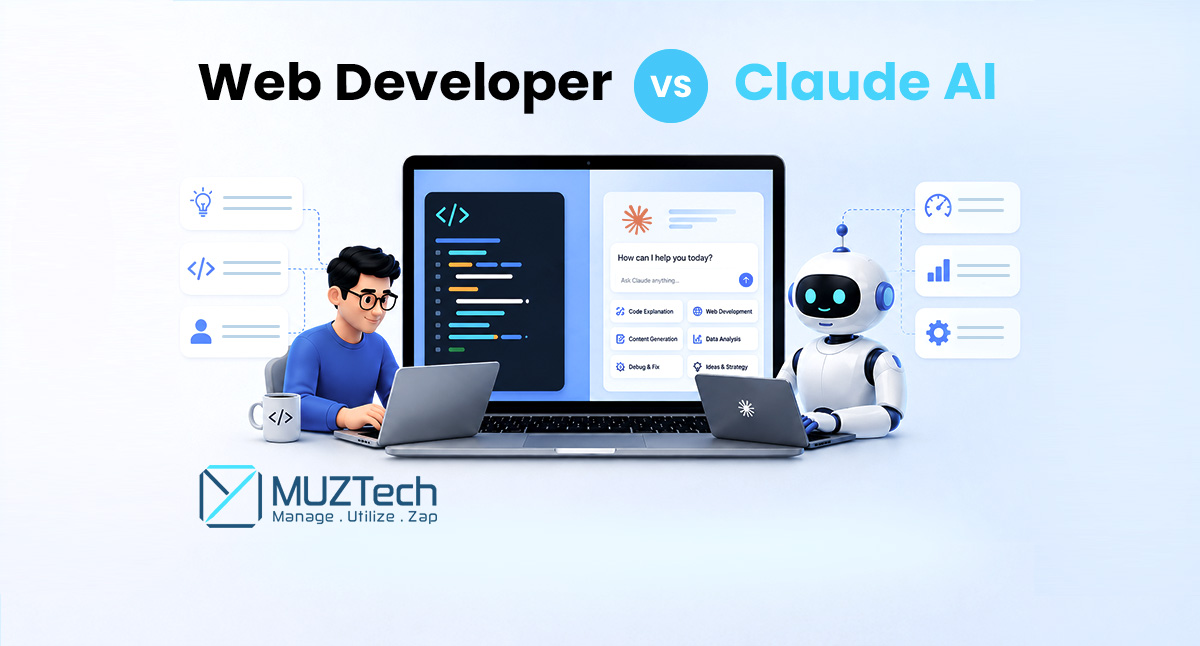
Web Developer vs Claude AI: The Future of Web Development
Artificial intelligence is changing web development at a speed that would have been difficult to imagine only a few years ago. AI coding tools such as Claude can now generate code, analyze existing projects, identify bugs, create components, write tests, explain technical problems, modify multiple files and assist with increasingly complex software-development tasks.
For businesses, this creates an obvious attraction. If an AI system can complete a coding task in minutes that previously required a developer several hours, development costs could fall and projects could move faster.
For developers, however, the situation is more complicated.
The question is no longer simply:
“Can Claude write code?”
It clearly can.
The more important questions are:
How much work can Claude actually replace?
How much money can businesses save?
How much faster can developers become?
Which development jobs are most exposed?
How much Claude usage can developers get from a $200 subscription?
How are tokens consumed or wasted?
And perhaps most importantly:
How can web developers remain valuable in an AI-driven industry?
The answer requires looking at AI as both a productivity technology and a force that is changing the economics of software development.
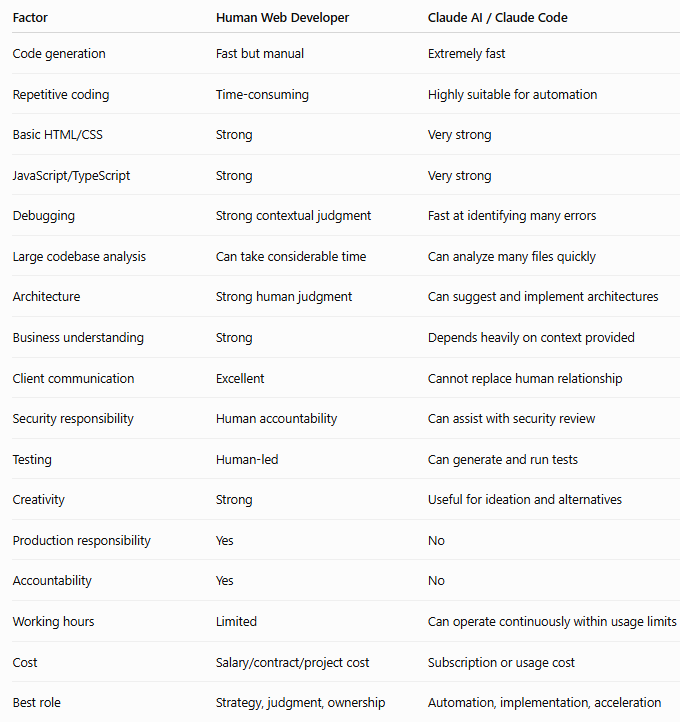
What Does a Web Developer Actually Do?
A web developer’s job is much broader than writing HTML, CSS or JavaScript.
A professional developer may be responsible for understanding business requirements, selecting technologies, designing architecture, developing frontend and backend systems, connecting APIs, managing databases, implementing authentication, testing applications, fixing production problems and maintaining software after launch.
Developers also make decisions that cannot always be reduced to a coding prompt.
A client might say:
“We need an e-commerce platform that is easy for customers to use.”
That statement leaves dozens of technical and business questions unanswered.
A developer may need to determine:
- What products will be sold?
- How will payments work?
- Which payment providers should be used?
- How will inventory be managed?
- What happens when an order fails?
- What customer information needs to be stored?
- What countries will the platform support?
- What security requirements apply?
- How should the application scale?
- Which technology is appropriate?
- What should be built now and what can wait?
This is why professional web development involves considerably more than generating code.
Developers may also be responsible for:
- Business and technical requirements
- System architecture
- Database design
- Frontend development
- Backend development
- API integration
- Authentication and authorization
- Testing
- Security
- Performance optimization
- Deployment
- Cloud infrastructure
- Monitoring
- Maintenance
- Client communication
- Technical documentation
- Troubleshooting
Claude can assist with many of these areas, but assistance does not automatically mean complete replacement.
What Is Claude AI?
Claude is an AI assistant developed by Anthropic. Its modern models are designed for reasoning, coding, document analysis and tool-based workflows.
Claude can be used as a general AI assistant, while Claude Code is designed specifically for software development workflows.
Claude Code can work with project files, analyze codebases, make changes, investigate problems and assist with development tasks.
This is important because AI-assisted development is moving beyond the traditional model of asking an AI chatbot:
“Write a JavaScript function.”
Developers can increasingly give AI larger objectives and allow it to work through multiple steps.
That creates a shift from simple code generation toward AI-assisted software engineering.
What Can Claude AI Do in Web Development?
Claude can assist with a wide range of development activities.
For example, developers can use it to:
- Generate HTML
- Create CSS
- Write JavaScript
- Build React components
- Generate backend code
- Create API endpoints
- Write SQL queries
- Generate tests
- Explain unfamiliar code
- Identify bugs
- Refactor code
- Convert code between languages
- Generate documentation
- Create README files
- Analyze error messages
- Suggest implementation approaches
- Review code
- Create scripts
- Analyze project files
- Assist with Git workflows
- Investigate problems across multiple files
This makes AI particularly valuable for repetitive development work.
Instead of manually writing every component, a developer can describe the desired behavior, allow Claude to produce an initial implementation and then review and improve the result.
Web Developer vs Claude AI: Who Is Faster?
Claude has a significant advantage when the task is predictable and primarily involves code generation.
A human developer may need to:
- Understand the task
- Search documentation
- Decide how to implement it
- Write the code
- Test it
- Identify errors
- Search for solutions
- Modify the implementation
- Test again
- Document the result
Claude can potentially compress many of these steps.
A simple component that takes a developer an hour to build manually may be generated in minutes.
However, there is an important distinction:
Code-generation speed is not the same as production-delivery speed.
A feature is not finished simply because AI has generated the code.
The implementation still needs to be:
- Tested
- Reviewed
- Integrated
- Secured
- Optimized
- Deployed
- Monitored
Therefore, businesses should measure time to reliable production, rather than simply measuring how quickly AI generates code.
How Much Time Can Claude Save Developers?
There is no universal percentage that applies to every developer or project.
AI productivity depends on:
- Developer experience
- Project complexity
- Programming language
- Quality of requirements
- Codebase structure
- AI model
- Context provided
- Testing infrastructure
- Number of iterations
- Developer’s ability to review AI output
For straightforward work, the time savings can be substantial.
AI can reduce the amount of time developers spend on:
- Boilerplate
- Documentation
- Simple components
- Basic scripts
- Test generation
- Code explanations
- Straightforward debugging
- Repetitive modifications
- Syntax research
This gives developers more time for:
- Architecture
- Business requirements
- Security
- Testing
- Product decisions
- Performance
- Client communication
- Technical strategy
The developer therefore shifts from being primarily a code producer to becoming a technical problem solver and AI-assisted builder.
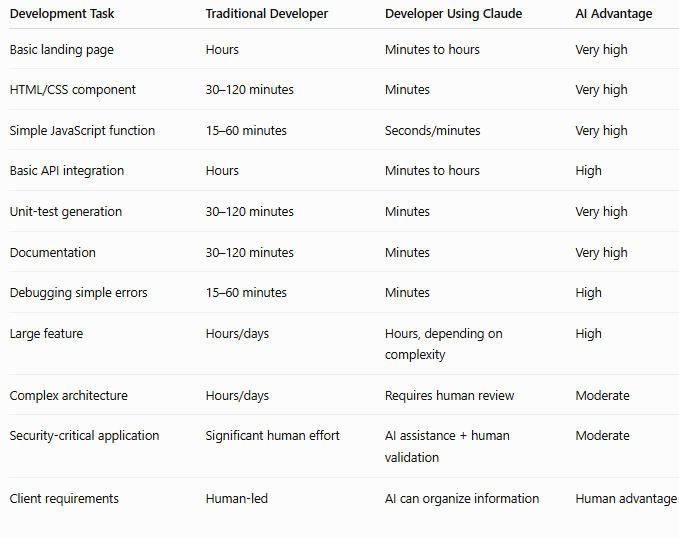
Which Web Development Tasks Can Claude Fully Replace?
AI is most likely to replace tasks rather than entire professions.
Tasks with high automation potential tend to be:
- Repetitive
- Predictable
- Clearly specified
- Easy to test
- Low risk
- Based on standard patterns
Examples include:
Basic HTML and CSS
Claude can create:
- Landing pages
- Navigation menus
- Forms
- Cards
- Tables
- Responsive layouts
- Basic animations
Boilerplate Code
AI can generate:
- Components
- Controllers
- Models
- Routes
- Interfaces
- Configuration
- CRUD structures
Documentation
Claude can quickly generate:
- README files
- API documentation
- Technical explanations
- Code comments
- Change summaries
Basic Refactoring
AI can help with:
- Renaming variables
- Simplifying functions
- Removing duplication
- Converting syntax
- Improving code organization
Basic Testing
Claude can generate:
- Unit tests
- Test cases
- Edge cases
- Test data
- Regression tests
Simple Debugging
For straightforward errors, AI can often identify the likely cause quickly.
For these types of tasks, the amount of manual coding required may become very small.
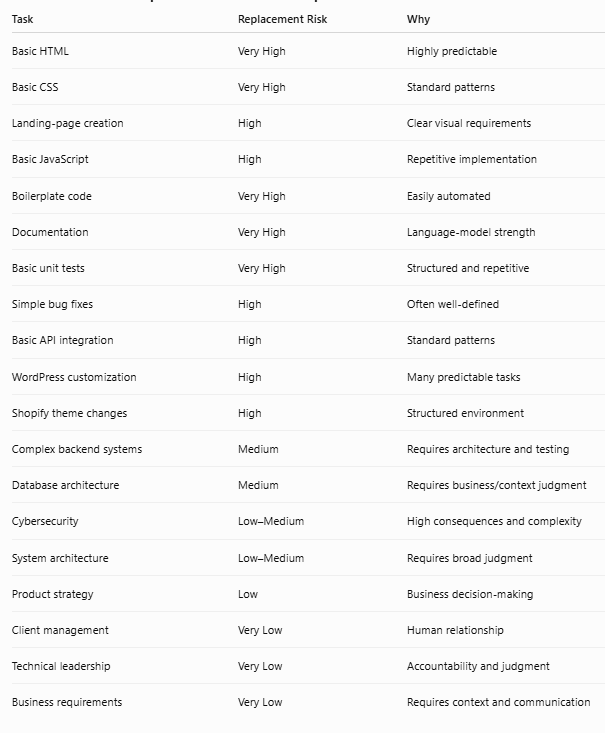
Which Development Tasks Can Claude Accelerate but Not Fully Replace?
Many tasks sit between automation and human development.
Claude can significantly accelerate:
- API integrations
- Database development
- Backend development
- Frontend applications
- Authentication
- Debugging
- Refactoring
- Performance optimization
- Test creation
- Legacy code analysis
- Deployment configuration
- DevOps scripts
However, these areas require careful human review.
For example, Claude may create an authentication system that appears to work correctly.
That does not automatically mean the system is secure.
A developer must still evaluate:
- User permissions
- Authentication flows
- Session management
- Authorization
- Input validation
- API security
- Data exposure
- Error handling
- Dependency vulnerabilities
AI can help with security, but it should not automatically become the final security authority.
Which Web Development Responsibilities Are Hardest to Replace?
The hardest responsibilities to automate are often those involving judgment.
Understanding Business Requirements
Businesses rarely provide perfect technical specifications.
Someone must translate business goals into technical requirements.
Architecture
A developer needs to decide whether a project should use:
- WordPress
- Shopify
- Laravel
- Node.js
- Python
- React
- Next.js
- Managed cloud services
- A custom architecture
There is no universal answer.
The decision depends on:
- Budget
- Scale
- Security
- Performance
- Maintenance
- Existing systems
- Team expertise
- Future requirements
Security
AI can identify potential vulnerabilities, but humans still need to determine security requirements and validate implementations.
Client Communication
A developer may need to explain why a feature is technically difficult, expensive or risky.
That requires communication and negotiation.
Accountability
If a production system fails, someone must take responsibility for resolving the problem.
AI does not replace organizational accountability.
Can Claude Replace a Junior Web Developer?
This is a more realistic question than asking whether AI can replace every developer.
Some junior-level work is highly exposed to automation.
Examples include:
- Basic website changes
- Simple frontend components
- Small bug fixes
- Documentation
- Boilerplate
- Simple scripts
- Basic API work
- Repetitive development
AI can perform or assist with much of this work.
That may reduce demand for some junior-level tasks.
Recent labor-market reporting has highlighted a shift toward greater demand for experienced software engineers, with AI increasingly handling some routine coding work that historically provided opportunities for junior developers.
This creates a serious challenge for people entering the industry.
However, it does not mean junior developers have no future.
It means they need to become productive with AI while developing strong fundamentals.
A modern junior developer should understand:
- Programming fundamentals
- Git
- APIs
- Databases
- Testing
- Debugging
- Security fundamentals
- AI-assisted development
- Code review
Can Claude Replace Senior Developers?
Replacing senior developers is considerably more difficult.
Senior developers often provide value through:
- Architecture
- Technical leadership
- Business understanding
- Security decisions
- System design
- Mentoring
- Risk management
- Code review
- Project planning
- Production ownership
AI can assist with many of these activities.
But experienced developers remain responsible for determining whether an AI-generated solution is appropriate.
In fact, AI may increase the productivity of senior developers.
A senior developer can use AI to:
- Prototype multiple approaches
- Analyze unfamiliar code
- Generate implementations
- Create tests
- Investigate errors
- Review code
- Produce documentation
This means experienced developers may be able to produce considerably more software without increasing their working hours.
How Much Does a Web Developer Cost?
The cost varies significantly depending on the country, experience, technology and employment model.
A developer might work as:
- A freelancer
- An agency contractor
- A full-time employee
- A remote contractor
- A specialized consultant
Businesses also pay costs beyond the developer’s salary or hourly rate.
These may include:
- Recruitment
- Benefits
- Equipment
- Software
- Training
- Management
- Paid leave
- Office costs
- Employee turnover
That makes a simple comparison such as:
“Developer costs thousands while Claude costs $200.”
misleading.
The two provide different things.
Claude provides AI capability.
A developer provides expertise, judgment, communication and accountability.
The more useful comparison is:
Developer without AI versus developer using AI.
How Much Does Claude Max Cost?
Anthropic currently offers Claude Max subscription tiers, including:
- Max 5x at $100 per month
- Max 20x at $200 per month
The $200 plan is therefore the Claude Max 20x plan.
But there is an important misconception to avoid.
The $200 plan should not be described as:
“You get X million tokens every month.”
Claude Max is a subscription with usage limits rather than simply a fixed token balance. Anthropic explains that usage depends on factors such as the model being used, conversation length, complexity and other characteristics of the workload.
Paid plans also operate around usage windows rather than functioning like a traditional prepaid API token account. Because Anthropic can change limits and plan structures, the exact current limits should always be checked before publishing specific numbers.

What Are Claude Tokens?
Tokens are units that AI models use to process information.
A token may represent:
- Part of a word
- A complete word
- Punctuation
- Programming syntax
- Source code
- Other text
For developers, the relevant information can include:
- Prompts
- Code
- Project files
- Conversation history
- Claude’s responses
- Tool results
- Other contextual information
The more information Claude needs to process, the more computational work can be involved.
This becomes particularly important when developers work with large repositories.
How Are Claude Tokens Used During Coding?
Imagine a project containing thousands of lines of code.
You ask:
“Fix the login problem.”
Claude may need to inspect:
- Login components
- Authentication logic
- API routes
- Middleware
- Database models
- Configuration
- Error messages
It may then generate:
- Analysis
- Code changes
- Commands
- Test results
- Explanations
A simple request can therefore become a much larger AI interaction.
The difference between a small coding task and a repository-level task can be enormous.
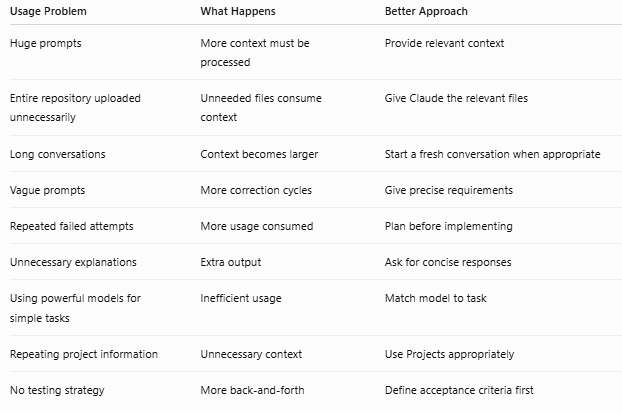
How Claude Usage Gets Wasted
Developers using Claude heavily should understand how inefficient workflows can consume usage unnecessarily.
Sending Too Much Context
If Claude only needs three files, sending an entire repository may be unnecessary.
Provide the context required to solve the problem, rather than everything available.
Poor Instructions
A vague prompt such as:
“Fix my website.”
forces the AI to make assumptions.
A more useful instruction might identify:
- The exact problem
- Relevant files
- What should not be changed
- Expected behavior
- Testing requirements
Better instructions can reduce unnecessary iterations.
Repeated Failed Attempts
One of the biggest sources of wasted usage is:
Prompt → incorrect implementation → test → failure → new prompt → another implementation → failure
Each iteration requires additional processing.
A better workflow is:
Understand → plan → implement → test → review
Huge Conversations
Long conversations can accumulate substantial context.
When a task changes significantly, a focused conversation may be more efficient.
Unnecessary Explanations
If you need a code modification, you may not need thousands of words explaining every line.
Ask for the amount of explanation required.
Using Maximum Reasoning for Everything
Simple tasks do not necessarily require the same reasoning resources as complex architecture or difficult debugging.
Use the appropriate tool and model for the problem.
Why Token Efficiency Matters
Token efficiency is not simply about saving money.
Focused context can also improve the quality of AI responses.
A useful workflow includes:
- Clear requirements
- Relevant context
- Specific acceptance criteria
- Focused conversations
- Appropriate model selection
- Testing
- Human review
The objective should not be to use the fewest possible tokens.
The objective is to use enough context to solve the problem correctly without unnecessary processing.
Is Claude Really Cheaper Than a Web Developer?
If the comparison is simply subscription cost, Claude is obviously cheaper.
A $200 monthly subscription is far less than the cost of employing a professional developer.
But a subscription does not provide the equivalent of a complete employee.
A developer provides:
- Technical knowledge
- Business understanding
- Communication
- Architecture
- Decision-making
- Testing
- Security judgment
- Accountability
- Maintenance
- Production ownership
Therefore, the more useful question is not:
“Can I replace my developer with a $200 subscription?”
It is:
“How much more can my developer accomplish with a $200 AI tool?”
That is where the economics become interesting.
The New Economics of Web Development
AI could change the economics of software development in several ways.
A developer who previously spent a significant portion of their time on repetitive work can delegate some of that work to AI.
The same developer may then be able to:
- Complete more features
- Serve more clients
- Build more prototypes
- Test more ideas
- Maintain larger projects
- Reduce repetitive work
- Spend more time on high-value decisions
This could allow businesses to produce more software with smaller teams.
However, the effect will not be identical across every company.
Complex enterprise systems still require architecture, security, testing and operational support.
WordPress and Claude AI
WordPress is an area where AI can provide substantial productivity benefits.
Claude can help developers with:
- Theme customization
- CSS modifications
- PHP snippets
- Plugin development
- Troubleshooting
- Template changes
- Database queries
- Technical documentation
For a simple business website, AI may dramatically reduce the amount of manual development required.
However, complex WordPress projects may still require professional developers for:
- Custom plugins
- Payment integrations
- Security
- Performance
- Large databases
- Third-party integrations
- Complex business logic
Shopify and Claude AI
AI can also accelerate Shopify development.
Developers can use Claude for:
- Liquid templates
- Theme customization
- Frontend changes
- Store functionality
- Scripts
- Troubleshooting
- API integrations
For a standard online store, this may reduce development time significantly.
Complex Shopify projects can still require experienced developers when custom applications, APIs and business processes are involved.
Custom Web Development and Claude AI
Custom development presents a more complex challenge.
A SaaS platform may involve:
- Authentication
- Databases
- Payments
- Subscriptions
- APIs
- User roles
- Admin dashboards
- Notifications
- Analytics
- Security
- Cloud infrastructure
- Complex business rules
Claude can assist with many of these components.
But someone still needs to determine how the components should interact.
As system complexity increases, human architecture and quality control become more important.
Are Developers Losing Jobs Because of AI?
This is where businesses and publishers need to be careful.
There is no reliable global number showing exactly how many web developers have lost their jobs specifically because of Claude or AI.
Companies rarely attribute layoffs to one technology.
Job reductions can result from:
- Economic conditions
- Restructuring
- Outsourcing
- Changing business priorities
- Reduced demand
- Automation
- AI adoption
Therefore, saying:
“AI has already replaced millions of web developers.”
would not be supported by reliable evidence.
What we can say is that AI is already automating meaningful portions of software development.
Anthropic’s analysis of hundreds of thousands of coding-related interactions found high levels of automation in Claude Code usage, demonstrating that developers are increasingly delegating actual coding work to AI. (anthropic.com)
The important distinction is:
Task automation is not the same thing as total occupational replacement.
Are Junior Developers More Vulnerable?
The evidence suggests that junior-level work faces significant pressure because many entry-level tasks are repetitive and predictable.
If AI can perform basic coding tasks quickly, businesses may need fewer people specifically for those activities.
That could change the traditional career ladder.
Previously:
Junior Developer → Mid-Level Developer → Senior Developer
The future may look more like:
Junior Developer + AI → Productive Engineer → Senior Engineer + AI
Developers entering the industry will need to demonstrate more than the ability to write basic code.
They need to demonstrate that they can understand problems, use AI, test solutions and learn quickly.
How Many Businesses Failed Because They Adopted AI?
There is no credible statistic showing that a particular number of businesses failed because they adopted AI.
That claim would confuse failed AI projects with failed companies.
However, there is strong evidence that many AI initiatives fail to reach meaningful production outcomes.
A 2026 Orgvue study reported that 78% of organizations surveyed had experienced AI projects that either failed or remained stuck in the pilot stage, including 35% reporting failures and 43% reporting projects stuck in pilots. (orgvue.com)
S&P Global also reported that organizations were abandoning a substantial share of AI initiatives before they reached production, with the share of organizations abandoning most AI projects increasing significantly in its research. (spglobal.com)
These figures do not mean:
“78% of companies failed because of AI.”
They mean that organizations frequently struggle to turn AI experiments into successful, scalable business applications.
That is a very different and much more defensible conclusion.
Why Do AI Projects Fail?
Companies sometimes approach AI with the wrong question.
Instead of asking:
“Where can AI create measurable value?”
they ask:
“How can we use AI because everyone else is using it?”
Common problems include:
Poorly defined objectives
A company may introduce an AI chatbot without determining what business result it is supposed to improve.
Poor data
AI cannot magically fix unreliable business data.
Weak integration
An AI system may generate excellent recommendations but fail to integrate with the company’s actual workflow.
Lack of ownership
Someone must remain responsible for:
- Accuracy
- Security
- Monitoring
- Costs
- Updates
- Escalation
Poor employee adoption
Employees may not use a system simply because management purchased it.
Unrealistic expectations
A successful AI demonstration does not guarantee successful production deployment.
Poor ROI measurement
Companies need to measure whether AI actually improves:
- Revenue
- Cost
- Productivity
- Customer experience
- Speed
- Quality
- Risk
Expert Evidence: AI Is Moving From Assistance Toward Automation
The available research suggests that AI use is not uniform across occupations.
Anthropic’s Economic Index initially found more observed AI use classified as augmentation than automation, with 57% of observed uses categorized as augmentation and 43% as automation. (anthropic.com)
However, software development is increasingly interesting because specialized coding agents can perform much more autonomous work than traditional chat-based assistance.
Anthropic’s software-development analysis found that 79% of Claude Code conversations involved automation, compared with 49% for coding conversations in Claude.ai. (anthropic.com)
This suggests that software development is one of the areas where AI may move particularly quickly from:
“help me do this”
toward:
“do this task for me and show me the result.”
But the same research also demonstrates the continued importance of feedback loops, testing and human intervention.
The emerging model is therefore not simply:
Human disappears → AI builds everything.
It is increasingly:
Human defines objective → AI performs work → Human evaluates → AI iterates → Human approves.
How Web Developers Can Survive the AI Revolution
Developers should not try to compete with AI at the things AI does best.
If Claude can generate a basic component in seconds, manually typing that component is no longer a strong competitive advantage.
Developers need to move up the value chain.
Learn AI-Assisted Development
Developers should become highly comfortable with:
- Claude
- Claude Code
- AI code generation
- AI debugging
- AI testing
- AI code review
- AI documentation
- Agentic development
AI should become part of the daily development workflow.
Become Better at Architecture
Learn:
- System design
- Databases
- APIs
- Cloud
- Security
- Scalability
- Performance
- Distributed systems
AI can generate code.
You need to understand how all the components should work together.
Learn to Review AI-Generated Code
This could become one of the most valuable skills in the profession.
A developer needs to determine:
- Is the code correct?
- Is it secure?
- Is it scalable?
- Is it maintainable?
- Does it meet the requirement?
- What assumptions did AI make?
- What edge cases were missed?
Understand Business
Developers who understand business problems can become much harder to replace.
Learn to ask:
- What problem are we solving?
- Who is the customer?
- What is the business outcome?
- What is the risk?
- What should be automated?
- What should remain human-controlled?
Specialize
Generic coding is increasingly accessible through AI.
Specialized expertise can provide stronger differentiation.
Developers can specialize in:
- Cybersecurity
- FinTech
- Healthcare technology
- Enterprise systems
- Cloud architecture
- DevOps
- AI integrations
- Data engineering
- E-commerce
- Automation
- Performance engineering
Practical Tips for Developers Using Claude
Give Claude Clear Requirements
Don’t simply say:
“Build this.”
Explain:
- What needs to happen
- Which files are relevant
- What technology is being used
- What must not change
- What the expected result is
- How the solution should be tested
Break Large Projects Into Smaller Tasks
Instead of:
“Build my entire SaaS application.”
Break it into:
- Authentication
- Database
- User dashboard
- Billing
- Notifications
- Administration
- Reporting
Smaller tasks are easier to validate.
Ask Claude to Plan Before Coding
For complex tasks, ask Claude to analyze the problem and create an implementation plan first.
Review the plan before allowing major changes.
Use Automated Testing
Don’t stop because Claude says:
“The implementation is complete.”
Run tests.
Ask AI to identify edge cases.
Review failures.
Then make corrections.
Keep Human Review
The larger or more sensitive the application, the more important human review becomes.
Pay particular attention to:
- Authentication
- Authorization
- Payments
- Personal data
- Database operations
- Security
- Production infrastructure
Practical Tips for Businesses
Businesses should not begin AI adoption by asking:
“How many developers can we fire?”
A better starting question is:
“Which development tasks can AI automate while maintaining quality and reducing cost?”
Begin with lower-risk activities such as:
- Documentation
- Prototyping
- Testing
- Code explanation
- Boilerplate
- Internal tools
- Simple website updates
Then measure the results.
Businesses should track:
- Development time
- Cost per feature
- Bugs
- Rework
- Developer productivity
- Security incidents
- Customer impact
- AI usage
- Production reliability
If AI makes coding faster but creates significantly more bugs and rework, the company has not necessarily improved productivity.
The New Web Development Workflow
Traditional development often looked like:
Requirement → Human writes code → Human tests → Human deploys
The AI-assisted workflow increasingly looks like:
Requirement → Human defines problem → AI plans → AI generates code → AI tests → Human reviews → Human validates → Deployment
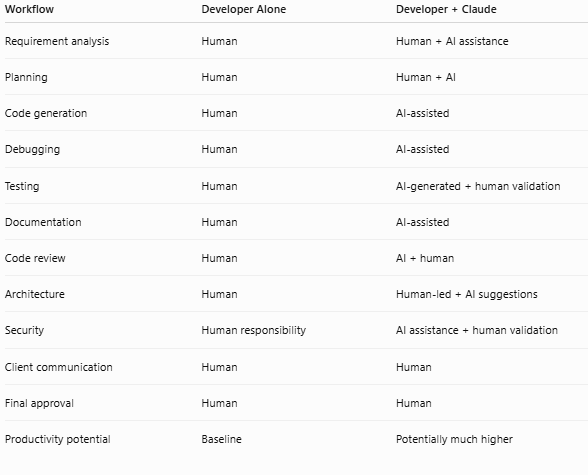
The human remains responsible for the outcome.
The difference is that the human can delegate much more implementation work to AI.
This can significantly increase developer leverage.
Could One Developer Eventually Do the Work of Several?
For some projects, AI could enable a skilled developer to accomplish work that previously required a larger team.
An experienced developer may use AI to:
- Generate code
- Analyze repositories
- Write tests
- Produce documentation
- Investigate bugs
- Create prototypes
- Review implementations
This can reduce the amount of manual work required.
However, one developer cannot automatically replace an entire engineering organization.
Complex systems require:
- Architecture
- Security
- Operations
- Testing
- Product management
- Customer support
- Risk management
AI increases leverage, but complexity does not disappear.
What Developers Should Stop Doing
Developers should stop treating manual code production as their primary competitive advantage.
AI is becoming increasingly good at:
- Boilerplate
- Syntax
- Repetitive coding
- Documentation
- Basic debugging
- Standard implementations
Developers should instead build stronger capabilities in:
- Problem-solving
- Architecture
- Security
- Product thinking
- Communication
- Business analysis
- System design
- Domain expertise
- AI orchestration
What Developers Should Start Doing
Developers should become the person who can take a business problem and turn it into a reliable technical solution.
That means:
- Understand the business requirement
- Design the architecture
- Give AI the right context
- Break the project into tasks
- Review generated code
- Test the implementation
- Check security
- Monitor production
- Take responsibility for the result
This is a much stronger position than simply being the person who writes code.
The Future of Web Development Is Not AI vs Humans
The most likely future is not that every developer disappears.
It is that the nature of development changes.
Some repetitive tasks will disappear.
Some junior-level opportunities may shrink.
Some development teams may become smaller.
Individual developers may become considerably more productive.
Software may become cheaper to build.
Businesses may create more applications because the cost of experimentation falls.
New categories of software and AI-powered products may also create new demand.
The industry therefore faces both displacement and expansion.
The Biggest Risk for Developers
The biggest risk is not necessarily that Claude becomes better at coding.
The biggest risk is refusing to adapt.
Imagine two developers with similar technical skills.
One uses AI to:
- Analyze requirements
- Generate code
- Write tests
- Debug
- Document
- Review
The other performs all these activities manually.
The first developer may deliver considerably more output.
Employers and clients ultimately care about:
- Quality
- Speed
- Reliability
- Cost
- Business results
They do not necessarily care how many lines of code were manually typed.
The Biggest Opportunity for Developers
AI can also create enormous opportunities.
A freelancer may be able to serve more clients.
A small agency may be able to handle larger projects.
A startup may prototype an idea faster.
A small business may afford custom software that previously cost too much.
An experienced developer may be able to manage several AI-assisted workflows simultaneously.
AI reduces the cost of creating software.
That can increase the number of people and businesses capable of building software.
Conclusion
Claude AI is already changing web development.
It can generate code quickly, automate repetitive work, analyze codebases, assist with debugging, create tests and support increasingly complex development workflows.
For simple and predictable tasks, AI can dramatically reduce the amount of manual development required.
Some tasks that once provided entry-level development work are particularly exposed.
However, professional web development is much larger than code generation.
Businesses still need people who can understand requirements, design systems, manage security, evaluate AI output, communicate with stakeholders and take responsibility for production software.
There is also no credible evidence that a specific number of web developers have already been completely replaced by Claude, or that a specific number of businesses have failed because they adopted AI.
The evidence instead points toward a more complicated transition.
AI is automating tasks.
Developers are becoming more productive.
Some traditional roles are under pressure.
AI projects frequently struggle to reach production value.
Businesses are learning that buying AI does not automatically create ROI.
And developers are discovering that their most valuable skills are moving beyond writing code.
The developer of the future will not necessarily be the person who writes the most code.
It will be the person who can:
understand the problem → design the solution → direct AI → review the implementation → test it → secure it → deploy it → take responsibility for the outcome.
That is why the real competition is not:
Web Developer vs Claude AI.
It is:
Web Developer Without AI vs Web Developer With AI.
The developers who understand this shift early will have the opportunity to use AI as a force multiplier rather than treating it only as a threat.
Frequently Asked Questions
Can Claude AI replace web developers?
Claude can replace or automate many individual development tasks, particularly repetitive and predictable work. It is not currently equivalent to an experienced developer responsible for architecture, security, business requirements, communication and production ownership.
Is Claude faster than a web developer?
Claude can generate code much faster than a human can manually type it. However, production development also requires testing, debugging, integration and validation. The meaningful measurement is therefore the overall time required to deliver a reliable solution.
Is Claude cheaper than hiring a developer?
A Claude subscription costs far less than employing a professional developer, but it does not provide the same capabilities or responsibilities. The more useful comparison is how much more productive a developer can become by using Claude.
How much does Claude Max cost?
Anthropic currently lists Max 5x at $100 per month and Max 20x at $200 per month. Pricing and usage limits can change, so current plan information should be checked before publishing.
Does Claude Max $200 give a fixed number of tokens?
No. Claude Max should not be treated as a prepaid fixed-token account. Subscription usage operates through usage limits that depend on factors including the model, conversation length and complexity.
What are Claude tokens?
Tokens are units used by AI models to process information. They can represent parts of words, words, punctuation, code and other text.
How can developers reduce wasted Claude usage?
Use precise instructions, provide relevant context, break large projects into smaller tasks, avoid unnecessary conversation history and reduce repeated trial-and-error iterations.
Can Claude build a complete website?
Claude can generate substantial portions of a website and assist with many development tasks. However, production websites still require testing, security, deployment, performance checks and human validation.
Will AI replace junior developers?
Some junior-level tasks are highly vulnerable to automation. This may reduce demand for certain types of entry-level work. Developers can reduce their risk by combining programming fundamentals with AI-assisted development, testing, debugging and system knowledge.
Will AI replace senior developers?
AI can automate portions of senior-level work, but experienced developers continue to provide value through architecture, leadership, security, business understanding and decision-making. AI may increase the productivity of senior developers rather than simply eliminate them.
Should developers still learn coding?
Yes. Understanding programming is arguably becoming more important because developers need enough technical knowledge to evaluate AI-generated code and identify incorrect, insecure or inefficient implementations.
Should businesses replace developers with AI?
Businesses should be cautious about treating AI as a complete replacement for development teams. A better strategy is to identify repetitive tasks that AI can automate, measure productivity gains and retain appropriate human oversight for architecture, security and production systems.